
An order mismatch shouldn’t send someone through five systems.
Build a NodeFox workflow that checks orders against your pricing, stock and account records. Move clean orders forward; give reviewers the mismatch and supporting evidence before an authorized ERP update. Built on NodeFox’s executable workflow platform.
One workflow, 4 different cases.
Pick a case to see which steps run, what a reviewer is shown and what gets written.
Synthetic example · Purchase order received
PO exception review
Arrives
PO 48213 · Halvorsen Supply
- SKU 1108-B
- 240 units @ $4.12
- Contract price
- $4.12
- On hand
- 1,960 units
- Ship by
- Nov 14
Runs
PDF, EDI export or email attachment arrives.
Customer, SKUs, quantities, unit prices and ship date into a typed record.
ERP API: contract price, on-hand quantity and credit status.
Exact rules in code: price within tolerance, stock covers quantity, required fields present.
Every line matches contract price and available stock.
The line in question, the contract price, stock position and source document.
Approve as priced, correct, or hold and contact the customer.
Only after the match or the reviewer’s approval.
Which checks ran, what was flagged, who decided.
Your team sees the discrepancy and the records behind it. Nobody re-assembles the same context from five screens for every order.
Result
Written
Sales order created
- SO-77104 written to ERP
- No reviewer time used
- Checks and source attached to the run
Work coordinated: input gathering, system lookups, repeated checks and approved updates. Select a step to inspect its role.
Human-owned: process rules, exception judgment and authorization. Synthetic records and transitions; no model calls or live system writes.
Interpret the order. Check the numbers. Gate the update.
The same work, with the checking done first.
- Today
Someone keys each PO into the ERP and eyeballs prices against the contract sheet.
With NodeFoxLines are extracted and checked against the price list and stock on arrival.
We measureHands-on minutes per order
- Today
Mismatches surface late, at invoicing or when the warehouse can’t pick.
With NodeFoxMismatches are flagged before the order is created, with the evidence attached.
We measureOrders held, and time from receipt to resolution
- Today
The reviewer rebuilds the story from email, ERP screens and the price file.
With NodeFoxThe reviewer gets one packet and three choices.
We measureReviewer minutes per exception
- Today
Corrections happen after the fact and nobody can say why a price was accepted.
With NodeFoxEvery decision is attached to the run that made it.
We measureCredits, rebills and rework against an audited sample
Raw input → usable output
Automate routine checks. Resolve the discrepancy with context.
Order entry gets validated line items and the price decision together, reducing the rekeying and follow-up between sales and fulfillment.
- Input 1
- PO-5824 · Acorn Industrial
- Input 2
- Line 1: 80 filters at $42
- Input 3
- Line 2: 20 valves at $95
- Input 4
- Requested ship date: Nov 12
SO-8126 · approved order
- 80 filters + 20 valves
- Order value: $5,320
- Price decision linked to order
Decision attached
Approve current valve price: $98
Source references and configured checks accompany the result.
Inspect the structured record
{
  "order_id": "SO-8126",
  "currency": "USD",
  "total": 5320,
  "lines": [
    {
      "sku": "filter",
      "quantity": 80,
      "unit_price": 42
    },
    {
      "sku": "valve",
      "quantity": 20,
      "unit_price": 98
    }
  ]
}Synthetic sample files with inputs, checks and decisions. System updates require configured access and authorization. Documents and reports depend on the chosen Writer format and template.
Automate routine checks. Resolve the discrepancy with context.
Transcript and demonstration details
Illustrative execution, not a customer deployment. Narration is AI-generated. Actions and outputs depend on workflow configuration.
- 0–9s · Two lines. One price discrepancy.
An order requests eighty filters and twenty valves. One line matches the contract; the other needs a price decision.
PO-5824 · Acorn Industrial · Line 1: 80 filters at $42 · Line 2: 20 valves at $95 · Requested ship date: Nov 12
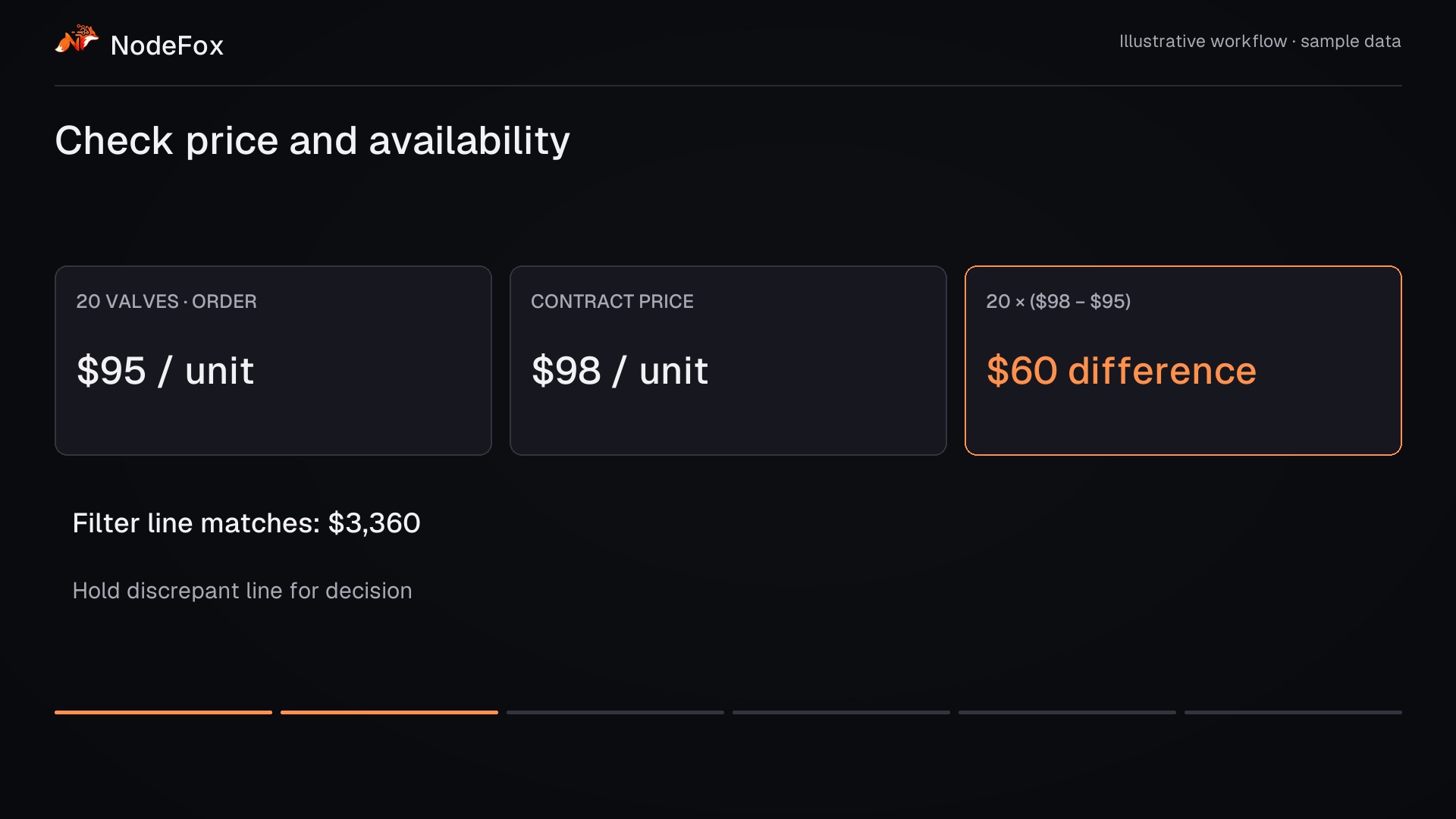
- 9–17s · Check price and availability
Readers retrieve stock and contract prices. Exact checks identify the three-dollar difference on each valve.
Filter line matches: $3,360 · Valve price differs by $3 · Hold discrepant line for decision
- 17–26s · Keep the clean line moving
The graph separates line validation from authorization. The order desk receives the discrepancy with its reference price.
Order inbox · ERP price book · Inventory API
- 26–34s · Authorize the corrected price
The reviewer approves ninety-eight dollars per valve. Only the authorized lines can proceed to the order output.
Order desk sees contract evidence · Approve current valve price: $98 · Release both authorized lines
- 34–43s · An approved order—not another handoff
The prepared order totals five thousand, three hundred and twenty dollars. Its price decision stays attached for downstream fulfillment.
SO-8126 · approved order · 80 filters + 20 valves · Order value: $5,320 · Price decision linked to order
- 43–52s · Trace each line to its source
The run record connects extracted lines, checks and approval. Measure handling time and rework against the current process.
PO-5824 · Acorn Industrial · Line 1: 80 filters at $42 · Line 2: 20 valves at $95 · Requested ship date: Nov 12
What does every order cost in coordination?
Editable hypothetical example · USD
What could less coordination be worth?
Change four assumptions to estimate annual capacity. These are example inputs, not customer results. Calculations stay in your browser.
- Annual capacity potentially released
- 1,820 hours
- Annual labor-capacity equivalent
- $81,900
- Reduction in hands-on time
- 58.3%
15,600 cases / year × 7 minutes removed per case ÷ 60. Includes eligibility, exception effort and rework when entered.
Capacity is not automatically cash savings. Value depends on how the released time is used and what the workflow costs to operate.
Your systems stay the system of record.
- Order inbox, EDI export or portalreadEmail attachments, files in a watched folder, or an API.
- ERP — accounts, price lists, stockread + writeThrough its API. Writes are limited to order creation and gated.
- Contract or pricing filereadA maintained spreadsheet or table, where pricing lives outside the ERP.
- Team email or chatwriteNotify the reviewer or account rep. Optional.
People keep the decisions that matter.
Order desk
Pricing or account owner
Process owner
Start with one order channel
Pick the channel with the most rework, such as one EDI partner, one customer segment or the email inbox. We run its real (or anonymised) orders through the checks, measure against your current handling and decide on production from the results.
Price, quantity and availability checks against your rules
Discrepancy packets and the reviewer step
ERP read access, plus a gated write path once you approve it
A baseline-versus-pilot scorecard
- Handling time per order
- Hands-on minutes from receipt to order created, clean and exception orders separately.
- Orders created without manual preparation
- Share of orders that pass every check and are written without a person touching them.
- Time to resolve an exception
- From flag to reviewer decision, by exception type.
- Rework
- Credits, rebills and corrections traced to order entry, checked against an audited sample.
Questions operations leaders ask
We already have an ERP. Why add anything?
Our exceptions are never identical.
Can it change orders on its own?
Who maintains the rules?
For the technical review.
Which orders take your team the longest?
Bring an order mismatch. We’ll discuss the price and stock checks, review decisions and system access needed to automate the handoff.